reading-notes
read before Class 1:
Duckett HTML book:
Introduction (pp.2-11)
The Structure of this Book:
-
HTML
-
CSS
-
Practical
HTML Chapter 1: “Structure” (pp.12-39)
Structure helps readers understand the stories in the page.
HTML Describes the Structure of Pages
<html>
<body>
<h1>This is the Main Heading</h1>
<p>This text might be an introduction to the rest of
the page. And if the page is a long one it might
be split up into several sub-headings.<p>
<h2>This is a Sub-Heading</h2>
<p>Many long articles have sub-headings so to help
you follow the structure of what is being written.
There may even be sub-sub-headings (or lower-level
headings).</p>
<h2>Another Sub-Heading</h2>
<p>Here you can see another sub-heading.</p>
</body>
</html>
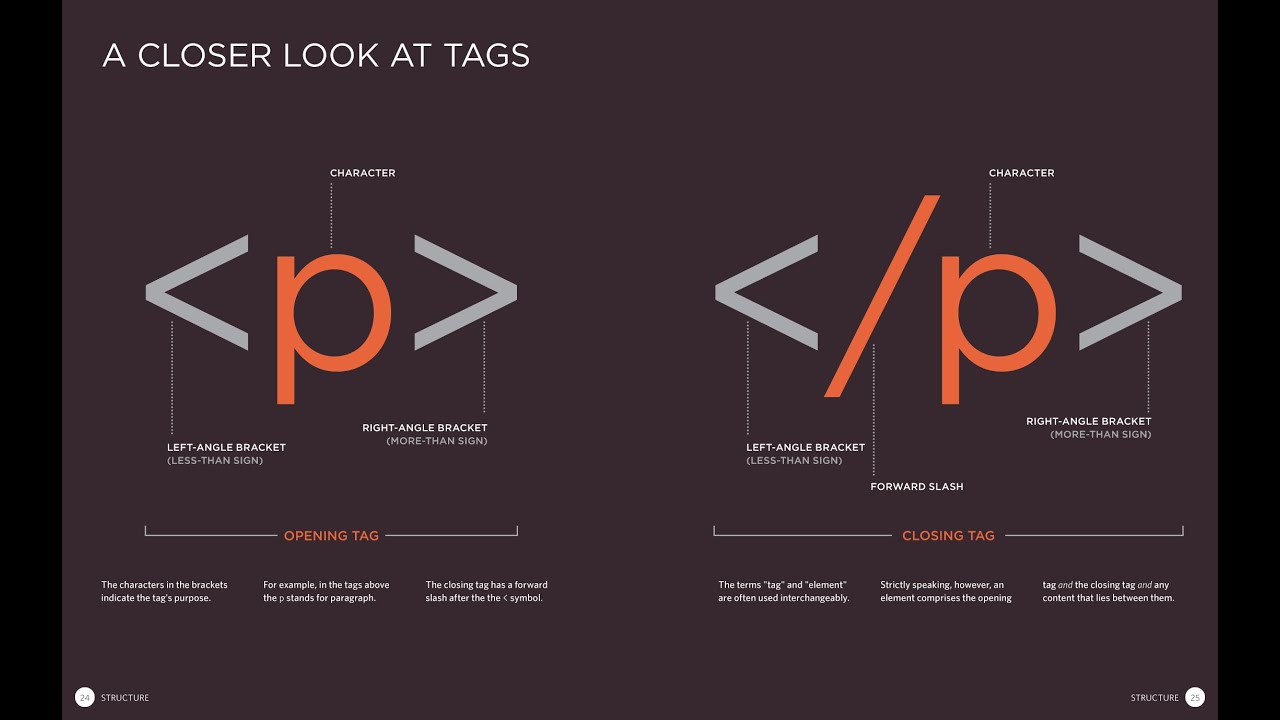
A Closer Look at Tags
HTML Chapter 8: “Extra Markup” (p.176-199)
Because there have been several versions of HTML, each web page should begin with a DOCTYPE declaration to tell a browser which version of HTML the page is using.
<!DOCTYPE html> that for HTML5.
comment in html , add the text between these characters:
<!-- comment goes here -->
Information About
Your Pages:
The <meta> element lives
inside the <head> element and
contains information about that
web page.
<!DOCTYPE html>
<html>
<head>
<title>Information About Your Pages</title>
<meta name="description"
content="An Essay on Installation Art" />
<meta name="keywords"
content="installation, art, opinion" />
<meta name="robots"
content="nofollow" />
<meta http-equiv="author"
content="Jon Duckett" />
<meta http-equiv="pragma"
content="no-cache" />
<meta http-equiv="expires"
content="Fri, 04 Apr 2014 23:59:59 GMT" />
</head>
<body>
</body>
</html>
Escape Characters: There are some characters that are used by HTML code.
HTML Chapter 17: “HTML5 Layout” (pp.428-451)
Traditional HTML Layouts
<div> elements and class or id attributes
to indicate the role.
New Html 5 Layout Elements
- Headers & Footers
<header> <footer> - Navigation
<nav> - Articles
<article> - Aside
<aside> - Sections
<section> - Heading Groups
<hgroup> - Figures
<figure> <figcaption> - Sectioning Elements
<div>
HTML Chapter 18: “Process & Design” (pp.452-475)
For good design there are some questions you must answer before beginning the design process:
- Who is the Site For?
It can be helpful to ask some questions about the people you would expect to be interested in the subject of your site.
- Why People Visit your Website
To help determine why people are coming to your website.
- What Your Visitors are Trying to Achieve
First you want to create a list of reasons why people would be coming to your site.
- What Information Your Visitors Need
Look at each of the reasons why people will be visiting your site and determine what they need to achieve their goals.
- How Of ten People Will Visit Your Site
Working out how often people are likely to revisit your site gives you an indication for how often you should update the site.
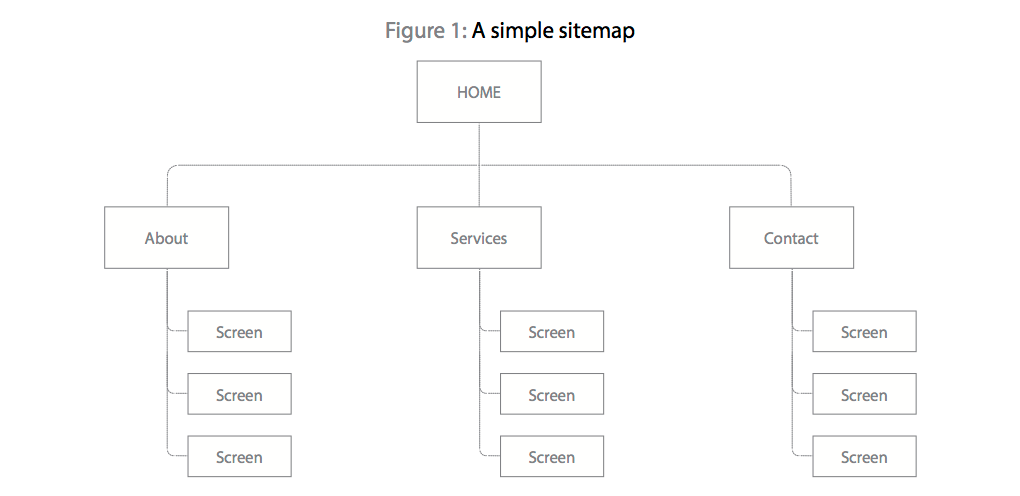
Site Maps
The aim is to create a diagram of the pages that will be used to structure the site.
WireFrames
By creating a wireframe you can ensure that all of the information that needs to be on a page is included.

From the Duckett JS book:
Introduction
JavaScript allows you to make the web pages more interactive.
HTML elements are added to the content of a page to describe its structure.
CSS uses rules to indicate how the contents of one or more elements should be displayed in the browser.
JS Chapter 1: “The ABC of Programming” (pp.11-52)
DESIGNING A SCRIPT TASKS
Once you know the goal of your script, you can work out the individual tasks needed to achieve it.
CREATING A BASIC JAVASCRIPT
just like HTML and CSS but When you want to use JavaScript with a web page, you use the HTML
<script> element to tell the browser it is coming across a script.
var today= new Date();
var hourNow = today.getHours();
var greeting;
if (hourNow > 18) {
greeting= 'Good evening!';
else if (hourNow > 12) {
greeting = ' Good afternoon!';
else if (hourNow > 0) {
greeting = 'Good morni ng!';
else {
greeting = 'Welcome! ' ;
document .write( ' <h3>' +greeting + ' </ h3>');