reading-notes
THE PAST, PRESENT & FUTURE OF LOCAL STORAGE FOR WEB APPLICATIONS
ersistent local storage is one of the areas where native client applications have held an advantage over web applications.
hey have three potentially dealbreaking downsides:
-
Cookies are included with every HTTP request, thereby slowing down your web application by needlessly transmitting the same data over and over
-
Cookies are included with every HTTP request, thereby sending data unencrypted over the internet
-
Cookies are limited to about 4 KB of data — enough to slow down your application (see above), but not enough to be terribly useful.
we need :
- a lot of storage space
- on the client
- that persists beyond a page refresh
- and isn’t transmitted to the server
INTRODUCING HTML5 STORAGE
What I will refer to as “HTML5 Storage” is a specification named Web Storage.
HTML5 Storage: Simply put, it’s a way for web pages to store named key/value pairs locally, within the client web browser.
From your JavaScript code, you’ll access HTML5 Storage through the localStorage object on the global window object. Before you can use it, you should detect whether the browser supports it.
function supports_html5_storage() {
  try {
    return 'localStorage' in window && window['localStorage'] !== null;
  } catch (e) {
    return false;
  }
}
USING HTML5 STORAGE
HTML5 Storage is based on named key/value pairs. You store data based on a named key.
interface Storage {
  getter any getItem(in DOMString key);
  setter creator void setItem(in DOMString key, in any data);
};
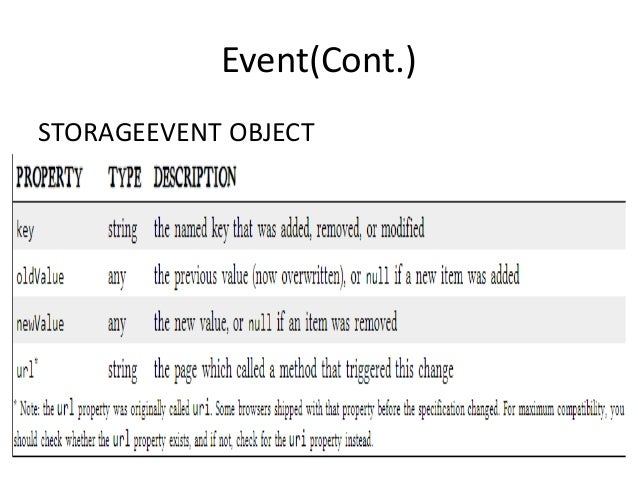
TRACKING CHANGES TO THE HTML5 STORAGE AREA
If you want to keep track programmatically of when the storage area changes, you can trap the storage event. The storage event is fired on the window object whenever setItem(), removeItem(), or clear() is called and actually changes something.